


Saltu is a free invoicing platform that makes it easier for Leap in! providers to manage NDIS invoices.
With fast payment processing and helpful features like pre-loaded support item numbers, Saltu saves you time so you can focus on supporting your clients.
Whether you’re submitting your first invoice or managing a growing client list, Saltu is built to save you time and make invoicing easier.
How Saltu helps.
Saltu helps Leap in! providers get invoicing right the first time. It includes pre-loaded NDIS support item codes and will flag if anything looks incorrect, helping you avoid common errors that can delay payment.
With Saltu, you can:
- Create and submit invoices online
- Track invoice status in real-time
- Export your full invoice and payment history (perfect for tax time)
- Check participant funding before delivering a service
- Update your contact and bank details
- Invite colleagues to help manage invoicing for your business
- Access all your invoicing information on desktop, tablet or mobile.
Whether you’re an independent support worker, sole trader or any business providing NDIS services, Saltu makes it easier to stay organised and on top of your invoicing.
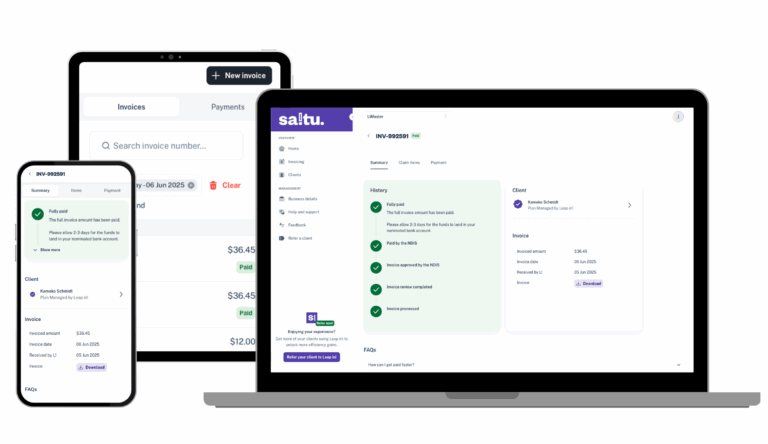
Fast, reliable invoice payments.
One of the biggest pain points for NDIS providers is waiting to get paid. Saltu helps solve that.
Leap in! processes 95% of compliant invoices within one business day. Saltu’s built-in checks flag anything that looks incorrect before the invoice is submitted, helping you avoid the errors that cause delays.
Our dedicated accounts team reviews and processes invoices efficiently, so you can count on your payments arriving quickly and consistently.
Create compliant NDIS invoices in minutes.
Creating NDIS-compliant invoices manually can be time-consuming and mistakes can lead to payment delays. Saltu helps by automatically generating an NDIS-compliant invoice PDF for your records while reducing common errors before you submit. The table below outlines the most frequent issues and how using Saltu can help.
| Issue | How Saltu helps |
|---|---|
| Incorrect support item number | All support items are pre-loaded, which makes this quick and easy. |
| Amount above the NDIS price limit | You will be notified when an item price that has been input exceeds the price guide limit. |
| Service date outside the plan period | Confirm the participant’s plan start and end dates before invoicing. Services delivered outside the plan period cannot be claimed. |
| Budget or funding period exhausted | The ‘funding confirmation check’ lets you verify if a participant has funding available before you deliver a service. |
| Missing participant NDIS number | Your client details are centrally stored in Saltu so you can avoid any mistyping or having to remember their number every time you submit the invoice. |
What providers are saying about Saltu.
Three steps to invoice creation.
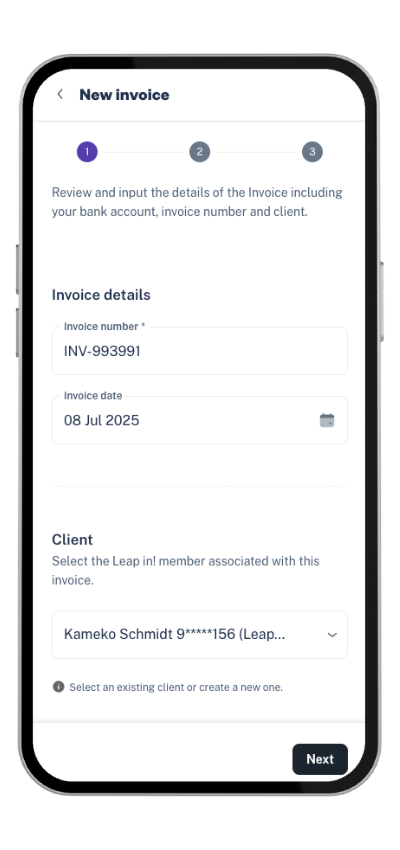
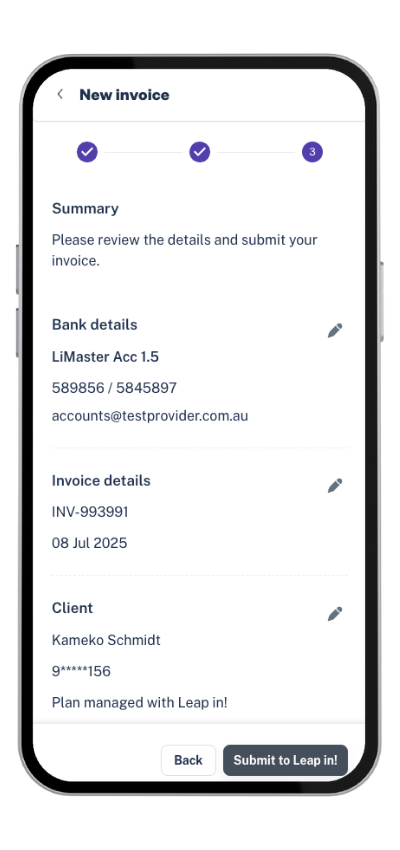
Once you’ve set up your business and payment details, creating an invoice can be done in three easy steps
1. Add invoice information. Enter the invoice number and date, then select the client.
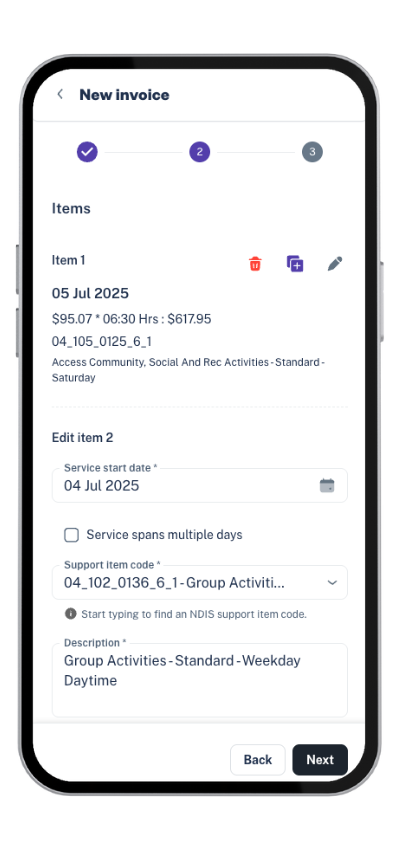
2. Add support items. Select the relevant support items from the integrated and current NDIS Price Guide and input the corresponding service details.
Good to know. You can add multiple support items to each invoice and choose whether the service was delivered on a single date or across a date range. To add another line item, click ‘+ Add new item‘ or duplicate an existing one to save time when using the same support code.
3. Review and submit. The system will let you know if you’ve missed any details. Once everything looks good, submit your invoice. Invoices generated through Saltu are processed faster, and remember, you can always track the progress of your invoice at any time.
Get started with Saltu.
If you’re a Leap in! provider and have received a payment from us recently, your unique Saltu sign-up link is included in your latest remittance advice email. Just click the link to create your account and get started.
- Already signed up? Log in here.
- Can’t find your link? If you’ve previously received a payment from Leap in! and can’t find your link, email [email protected] with your ABN and we’ll send it to you.
- Invoicing Leap in! for the first time? You’ll receive a Saltu sign-up link with your first payment.
Visit the Saltu page on the Leap in! website for more information.
Have questions?
We’re here to help. Call us on 1300 05 78 78, email us at [email protected] or chat with us online at www.leapin.com.au.